


Black Friday is already here, and the main Walmart sale runs only until Nov. 29. If you run a small shop, work from a home office, manage a team, or help a nonprofit, this one is worth a quick look. This guide keeps things short and simple. You will see what Walmart Business is, how the sale works, and what to check before you pay.
What Is Walmart Business?
Walmart Business is a shopping site made for small and mid-size businesses and nonprofits. It sits next to the regular Walmart.com site, but it is organized around what an organization usually buys. Think office supplies, furniture, snacks and drinks, cleaning and restroom supplies, electronics, and other things a workspace needs.
You can open a free account. There is also a paid plan called Business+ with extra perks. We cover both below.
When Do the Black Friday Deals Run?
Walmart‘s main Black Friday event runs from Nov. 23 to Nov. 29. On Walmart.com it starts at 12:01 a.m. ET. In stores it starts at 6 a.m. local time. Walmart has also planned a Cyber Monday event from Nov. 30 to Dec. 2, and that one is online only.
So if you are reading this today, you still have a few days. Do not wait for the last night though. Popular items can sell out, and some deals can end early.
What the Campaign Is Showing
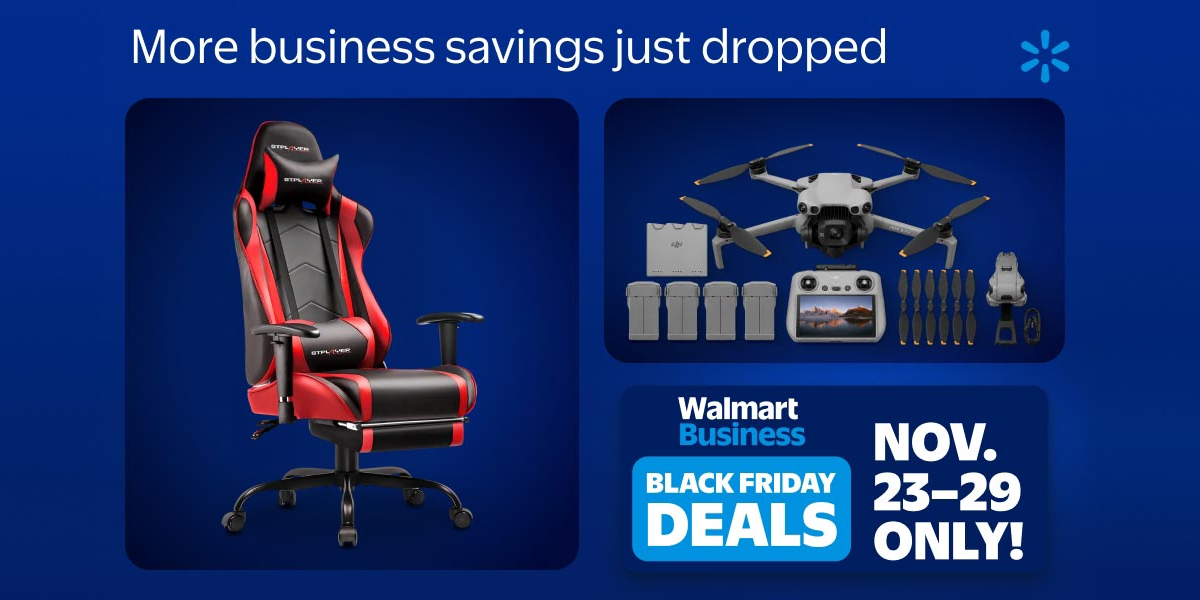
The banner for this campaign says “More business savings just dropped” and shows two items.
- A gaming chair with a footrest. It is red and black, with a high back and a neck pillow. A chair like this can also suit a home office or a long desk day, not only gaming.
- A camera drone bundle. The picture shows the drone, a controller with a screen, extra batteries, spare propellers and a charging hub. Photographers, real estate agents and content creators often look at kits like this.
I am not quoting prices on purpose. Prices and stock change fast during Black Friday. The price on the product page when you check out is the one that counts.
Who Should Use Walmart Business?
It is not only for big companies. These people can get something out of it:
- Small shop owners who restock supplies every month
- Freelancers and home office workers who buy equipment for work
- Teams who want one account and shared payment details
- Schools, nonprofits and community groups
- Anyone who buys in bulk and is tired of many small orders
If you only buy one thing once a year, the normal Walmart.com site may be enough. A business account makes more sense when you buy often.
What Can You Buy for Work?
Here are some everyday categories that a small business or office usually needs:
- Workspace basics: desks, chairs, storage and lighting
- Office supplies: paper, pens, printer ink and packing items
- Tech and gadgets: headphones, small electronics, cameras and accessories
- Cleaning and restroom supplies: things you buy again and again
- Break room items: coffee, snacks and drinks for staff or customers
The smart move is to start with the things you already buy every month. A discount on something you use anyway is real savings. A discount on something you never needed is just spending.
Free Account or Business+?
A free Walmart Business account has no fee, and your savings come from Walmart’s everyday low prices. Business+ is a paid membership on top of that.
According to Walmart’s own business pages, Business+ includes free shipping with no order minimum on eligible items, plus rewards on larger orders. Terms apply, and some items, such as marketplace or oversized products, may be left out. The fee and the rules can change, so check the current details on the site before you sign up.
A simple way to decide:
- Buy rarely? Start with the free account.
- Order often and pay for shipping a lot? Look at Business+ and do the math.
Tax-Exempt Shopping
This part is useful for schools, nonprofits and other tax-exempt groups. Walmart has a Tax-Exempt Program. Eligible organizations can enroll once, and the exemption is then applied to eligible purchases at checkout. You do not need to send paperwork with every order.
Not every organization qualifies, so read the rules on the site first. It is best to apply before you start shopping, so everything is ready when you check out.
Why Teams Like One Account
When a few people buy for the same business, things get messy fast. Who ordered this? How much did we spend? One shared account keeps orders and payment details in one place. Walmart also offers budget and spending tools for business accounts, so it is easier to see where the money goes.
It is a quiet benefit, but it matters more as a business grows.
Pickup, Delivery or Shipping?
Walmart Business orders can be shipped, delivered, or picked up in a store, depending on the item and your area. That helps when you need something fast.
Regular Walmart.com shoppers also have Walmart+, which is a separate plan for free delivery and shipping perks. For this guide the main point is simple: look at the delivery options at checkout, and compare the delivery date, not only the price.
How to Start in Five Easy Steps
- Open the Walmart Business site and create a free account.
- Add your business or organization details.
- If you are a nonprofit or school, apply for the tax-exempt program.
- Search for the items you already need, and save them to a list.
- Compare the total price, delivery date and return rules, then place your order.
It takes only a few minutes, and your details are saved for the next order.
Quick Checklist Before You Buy
Use this short list on any deal, not only the two items in the banner.
- Check the final price. Look at the total with shipping and tax, not just the big sale number.
- Check the seller. Some items are sold by other sellers on Walmart’s site. Read who sells it and who ships it.
- Check the return policy. Know how many days you have if the item does not work out.
- Check the warranty. For tech like drones, see what the warranty covers.
- Check the reviews. Read a few low ratings as well as the high ones.
- Check your budget. A sale price is only a good deal if you really need the item.
Mistakes to Avoid
Black Friday makes people rush. Here are the common mistakes:
- Buying only because the discount percentage looks big
- Skipping item details such as size, model or what is in the box
- Forgetting accessories that are sold separately, like memory cards or spare parts
- Not comparing the price with other stores
- Waiting until the last day and finding the item out of stock
For the drone especially, read the full list of what comes in the box. Also check the drone rules in your area before you buy, since flying rules are different in each place.
A Simple Example
Say you run a small online shop from home. You need a better chair for long hours, a few packing supplies, and some printer ink. Instead of buying each one on a different site, you can put them in one Walmart Business cart. You see one total, one delivery plan and one receipt for your records.
That is the real idea behind a business account. It is not about one big deal. It is about fewer steps and fewer surprises across many orders.
Wrapping Up
Walmart Business is a simple option for small businesses, teams and nonprofits who want everyday low prices and a site built around work needs. The Black Friday event gives you a good reason to look at it now, since it runs until Nov. 29 and Cyber Monday follows on Nov. 30.