


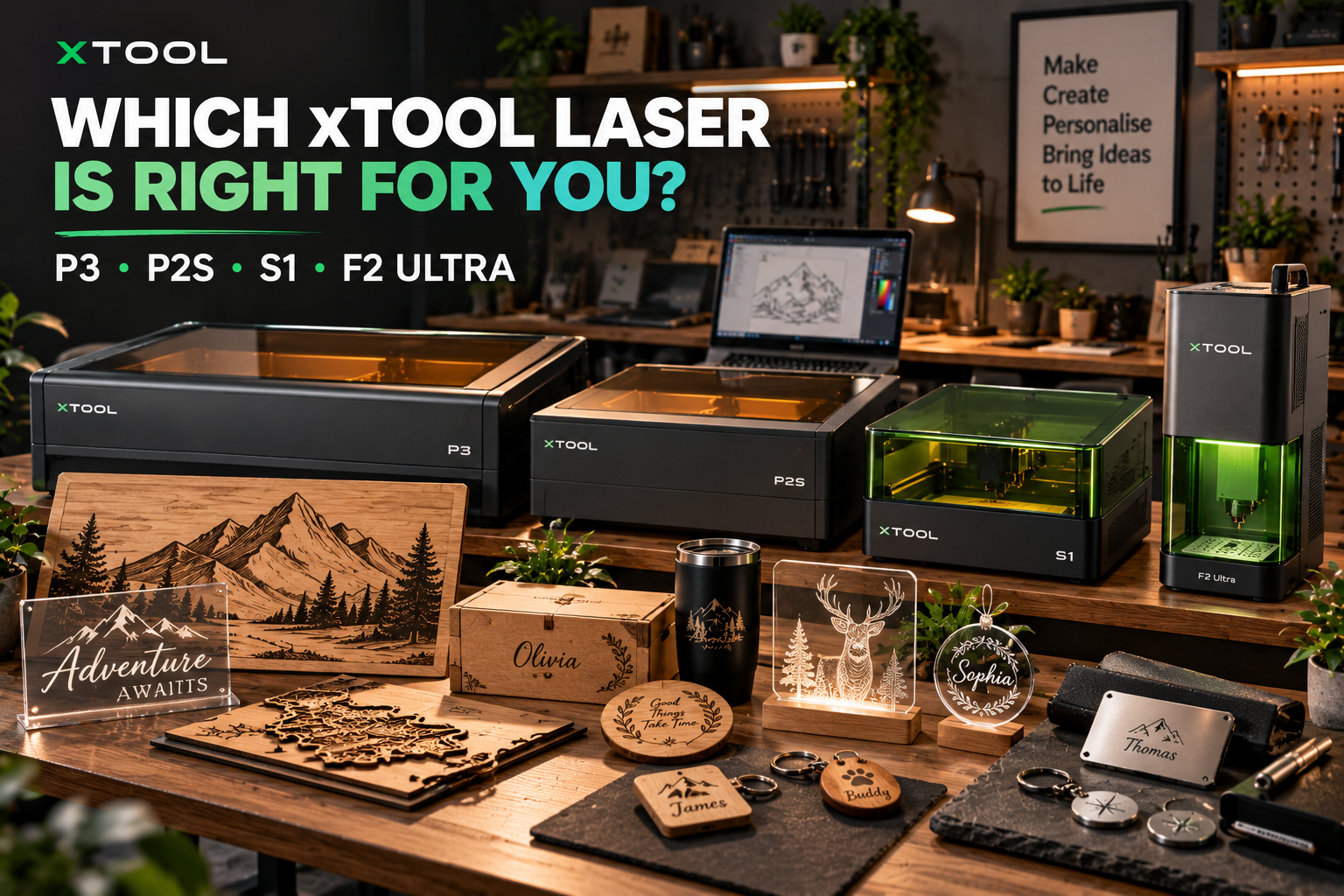
Choosing the right laser machine can make a significant difference to the quality of your products, your production speed, and the range of projects you can take on. Whether you want to create personalised gifts, cut wooden decorations, produce acrylic signs, or engrave metal accessories, the equipment you choose should match the work you intend to do. With several technologies and machine configurations available, exploring the product range from Xtools can help you understand which features are genuinely useful for your projects.
For hobbyists, the priority may be a machine that fits comfortably into a home workshop and supports a variety of creative projects. Small business owners, on the other hand, may need a larger working area, faster processing, or specialised engraving capabilities to fulfil customer orders efficiently. A machine that works well for cutting wooden panels may not be the best option for detailed metal engraving, so comparing individual products is essential. Understanding the differences between Xtools machines allows you to make a more informed decision based on your materials, budget, workspace, and production goals.
Among the options worth exploring are the xTool P3, P2S, S1, and F2 Ultra. These machines serve different purposes, ranging from larger-format CO2 cutting and engraving to enclosed diode laser applications and specialised metal processing. Instead of assuming that the most powerful machine is automatically the best, it is worth examining what each product offers and where it fits into a real working environment. This guide explores the main features, practical applications, and important buying considerations for each model available through Xtools.
Understanding the Different Types of Laser Machines
Before comparing individual products, it helps to understand why laser technology matters. CO2 lasers are commonly used for cutting and engraving suitable non-metal materials, including many types of wood and acrylic. Diode lasers can support a variety of craft, engraving, and cutting applications, depending on their output and the material being processed. Fiber lasers are particularly relevant for marking and engraving suitable metals, making them useful for certain personalised products and industrial-style applications. The different technologies represented in the Xtools range give buyers several options depending on the type of work they want to complete.
Another important distinction is the difference between cutting and engraving. Cutting separates a material into a specific shape, while engraving creates a design, pattern, or mark on its surface. Some machines can perform both tasks, but their capabilities depend on the laser source, power, material thickness, and processing settings. A machine designed primarily for detailed engraving may not be the most efficient choice for cutting large panels, while a cutting-focused system may offer more capacity than a small personalised-gift business needs. When evaluating Xtools equipment, identify your main applications before comparing individual specifications.
It is also important to consider the complete setup rather than the machine alone. Workspace requirements, ventilation, software compatibility, material handling, maintenance, and additional accessories can all affect your experience. A machine that appears suitable on paper may become impractical if it does not fit your available space or requires accessories outside your budget. Reviewing the installation requirements and product specifications of Xtools before purchasing can help you avoid unexpected costs and choose equipment that fits your working environment.
xTool P3: A Powerful CO2 Laser for Larger Projects
The xTool P3 is an 80W CO2 laser cutter and engraver designed for users who need a larger working area and production-focused capabilities. Its advertised working area is approximately 915 × 458 mm, making it suitable for considering larger signs, decorative panels, acrylic components, and projects that involve several pieces arranged within one layout. The machine is positioned for users who need more capacity than a compact desktop laser can provide. If your work involves larger cutting and engraving jobs, the Xtools P3 is a product worth investigating.
What Makes the P3 Stand Out?
The P3 combines an 80W CO2 laser with a larger working area and features intended to support an efficient workflow. xTool advertises cutting capabilities of up to 20 mm basswood and 25 mm acrylic under suitable conditions, although actual results depend on material composition, thickness, settings, and the finish required. These advertised figures provide an indication of the machine’s intended capabilities, but they should not be treated as guaranteed results for every material or project. For users who regularly work with suitable wood and acrylic, the Xtools P3 offers a higher-capacity option to compare with smaller systems.
The machine also incorporates camera-based positioning and other automated features intended to assist with material placement and job preparation. These features can be useful when positioning designs accurately or organising repeated production runs. If you produce multiple components from the same sheet, a larger working area and an organised layout may help you plan jobs more effectively. However, the practical value of these features depends on your workflow, so consider whether the Xtools P3’s automation and working capacity would make a meaningful difference to your projects.
Who Should Consider the P3?
The P3 is worth considering for workshops producing large wooden signs, acrylic displays, decorative panels, and other products that benefit from a substantial cutting area. It may also suit an established business that regularly handles larger orders or wants to increase production capacity. Having more room to arrange designs can make certain jobs easier to plan and may reduce the need to divide larger designs into multiple sections. If your product range depends on these capabilities, Xtools offers the P3 as a production-oriented option.
However, the P3 is not automatically the right choice for every creator. Its larger size and weight require a suitable installation area, while the purchase price and ongoing operating requirements need to make sense for your expected workload. Someone producing a few small personalised gifts each month may not benefit enough from the extra capacity to justify the investment. Before choosing the Xtools P3, consider your available space, budget, production volume, and the dimensions of the products you intend to make.
xTool P2S: A Versatile CO2 Laser for Custom Products
The xTool P2S is a 55W CO2 laser cutter and engraver with an advertised working area of approximately 600 × 305 mm. It offers a smaller footprint than the P3 while retaining cutting and engraving capabilities for a range of suitable materials. This makes it worth considering for personalised gifts, wooden decorations, acrylic products, custom signs, and other projects that fit within its working area. For creators who want CO2 laser capabilities without necessarily needing a larger production system, the Xtools P2S deserves attention.
Features for Everyday Production
The P2S includes camera-assisted positioning and features intended to simplify material placement and design preparation. Its camera arrangement can help users preview their workpiece and position artwork, which is useful when accuracy matters. The machine also supports passthrough functionality for certain longer workpieces when configured appropriately, allowing users to investigate projects that extend beyond the standard working area. These features can make the Xtools P2S attractive to makers who want flexibility without moving to a substantially larger machine.
The P2S is designed for cutting and engraving applications involving suitable materials such as wood and acrylic. Its advertised cutting performance depends on the material and processing conditions, so it is important to consult the official specifications before choosing materials for a project. Different acrylic formulations, wood types, surface coatings, and thicknesses can produce different results. By checking compatibility and testing suitable materials, users can better understand what the Xtools P2S can realistically achieve in their own workspace.
P2S vs P3: Which Is More Practical?
The P2S may be the more practical option if most of your products fit comfortably within its working area. It can suit small custom-gift businesses, makers producing home décor, and users who want to cut and engrave suitable materials without dedicating as much room to their equipment. The P3 becomes more compelling when the additional capacity and production-focused features directly support your workload. Comparing the two Xtools machines against your actual project dimensions can help you avoid paying for unused capacity.
A useful way to decide is to measure the largest items you expect to produce regularly and consider how many pieces you want to process in one job. If your work consists mainly of smaller decorative items, the P2S may provide enough room. If you frequently produce larger panels or arrange many components on a single sheet, the P3’s bigger working area may be more beneficial. Choosing between these Xtools models should come down to your actual production requirements rather than the assumption that a higher-powered machine is always the better investment.
xTool S1: An Enclosed Diode Laser for Creative Applications
The xTool S1 is an enclosed laser cutter and engraver available with different laser module options. These include diode configurations intended for various craft, engraving, and cutting applications, along with a separate infrared module for suitable engraving tasks. The exact capabilities depend on the selected configuration, so it is important to check the module included with the product before purchasing. For users exploring an enclosed machine for personalised products and creative projects, the Xtools S1 is another option to consider.
Why the S1’s Configuration Matters
Different laser modules are designed for different applications, which means the version you choose can affect the products you are able to make. A higher-powered diode module may be suitable for certain cutting and engraving jobs, while an infrared module serves different engraving purposes, including work on compatible metals. The modules should not be treated as interchangeable, and the presence of multiple options does not mean that every configuration can process every material. Before selecting the Xtools S1, confirm the specifications and intended applications of the exact version you plan to buy.
The S1 also supports software workflows involving xTool Creative Space and LightBurn, according to its product information. Software compatibility can affect how easily you prepare designs, control the machine, and integrate it into your existing workflow. If you already use a particular design program, check the supported software and operating requirements before purchasing. Reviewing the configuration, accessories, and software details of the Xtools S1 can help you determine whether it fits your experience level and creative plans.
What Can You Make With the S1?
Depending on the selected module and material compatibility, the S1 may suit personalised wooden gifts, decorative pieces, labels, signs, ornaments, and other craft products. It can be worth considering for makers who want an enclosed system for projects that fit within its working area. Its capabilities should still be assessed against the materials and thicknesses you intend to process, because not every diode laser can perform the same tasks. For a craft-focused setup, the Xtools S1 offers an option worth comparing with other enclosed machines.
The S1 may be less suitable for users whose main requirement is high-capacity cutting of larger or thicker materials that call for a more powerful CO2 system. Similarly, metal engraving results depend on the laser module and the surface being processed. If your product range relies on cutting large acrylic pieces or detailed metal engraving, compare the S1 with the P2S, P3, or F2 Ultra instead of assuming one machine can handle every task. Matching the Xtools S1 to the right applications is the key to getting value from the purchase.
xTool F2 Ultra: Specialised Engraving for Metal and More
The xTool F2 Ultra is designed for users who need specialised engraving capabilities, particularly for metal products. Its dual-laser configuration combines a 60W MOPA fiber laser with a 40W diode laser, while the product range also includes a separate fiber-laser version. The fiber laser is designed for metal-focused applications, while the diode laser supports compatible non-metal materials. For businesses producing metal accessories, engraved plates, personalised items, or detailed custom products, the Xtools F2 Ultra is a product worth examining.
What Does MOPA Fiber Laser Technology Offer?
MOPA fiber laser technology is relevant to detailed marking and engraving on suitable metal surfaces. Depending on the material and settings, it can support text, logos, patterns, and selected colour-marking applications. The actual result depends on the metal, its surface finish, the laser parameters, and the design, so colour effects and engraving depth should never be assumed to be identical across all products. If your work relies on detailed metal personalisation, the Xtools F2 Ultra provides specialised capabilities to investigate.
The diode laser in the dual-laser version expands the range of compatible non-metal applications. This can be useful if your product range includes metal items alongside selected wooden or other compatible products. However, the two laser sources have different strengths, and their capabilities should be evaluated separately rather than assuming that one process will work for every material. Before buying the dual-laser Xtools F2 Ultra, decide whether your workflow genuinely benefits from both technologies or whether a more specialised configuration would be sufficient.
Who Benefits Most From the F2 Ultra?
The F2 Ultra may suit businesses that specialise in engraved metal tags, business gifts, metal cards, suitable jewellery components, and other compact personalised products. Its specialised engraving capabilities make it distinct from the P3 and P2S, which are primarily focused on CO2 cutting and engraving. If your products depend on precise metal marking rather than cutting large panels, the F2 Ultra may be a more relevant investment. The Xtools F2 Ultra is particularly worth considering when metal engraving is central to your business model.
Before purchasing, think about the dimensions of your products, the metals you plan to use, the level of detail required, and the expected number of orders. You should also check the software, accessories, installation requirements, and safety information for the exact configuration. If most of your work involves cutting larger non-metal materials, a CO2 system may be more appropriate; if detailed metal engraving is your priority, the F2 Ultra may deserve a place at the top of your shortlist. Comparing these Xtools products against your actual work will help you make a more informed choice.
Which xTool Machine Is Best for Your Business?
The best machine depends on the work you expect to complete most often. The P3 is a strong candidate for larger cutting and engraving projects, while the P2S offers a smaller CO2 platform for suitable wood, acrylic, and other compatible materials. The S1 may be more appropriate for craft-focused applications that match its selected module, while the F2 Ultra is designed for specialised engraving involving metal and compatible non-metal materials. Instead of looking for a single winner, compare the products from Xtools according to your intended applications.
If you are starting a small business, begin with a realistic estimate of your expected orders and production costs. Calculate how much you can charge for each item and account for materials, packaging, failed samples, maintenance, accessories, and your own time. A machine should support a viable production process rather than simply offer impressive specifications. Building a basic business plan before purchasing Xtools equipment can help you decide which features justify the investment and which can wait until your business grows.
Your available workspace should also influence the decision. Larger CO2 systems need sufficient room for installation, material handling, ventilation, and maintenance. Smaller machines can be easier to accommodate, but they still require a suitable working surface and the safety arrangements specified by the manufacturer. Check the dimensions, weight, electrical requirements, and installation guidance before ordering from Xtools, particularly if you plan to use the equipment in a home workshop.
Accessories, Software, and Ongoing Costs
The advertised machine price may not represent the full cost of getting started. Depending on the model and intended application, you may need ventilation or filtration equipment, rotary accessories, material supports, passthrough components, or other compatible additions. Product bundles can differ, so read the package details carefully and avoid assuming that every accessory shown in promotional images is included. Reviewing the available configurations from Xtools can help you work out the total cost of a suitable setup.
Software is another important consideration. Check which applications are supported, whether your computer meets the system requirements, and how easily the machine integrates with your existing design workflow. If you already create designs using specific software, confirm compatibility before purchasing. Official tutorials and documentation can also help you understand how to prepare files, position materials, and configure jobs. Taking the time to review the software requirements of Xtools products can make the transition from purchase to production smoother.
Maintenance and support should not be overlooked. Different laser technologies have different cleaning, inspection, and component-replacement requirements, so check the recommended maintenance schedule for your chosen model. Review the warranty terms, return conditions, availability of replacement parts, and support options that apply in your region. These details can affect the long-term cost and convenience of ownership. Before placing an order through Xtools, make sure you understand the practical responsibilities that come with operating and maintaining the machine.
Safety and Material Compatibility
Laser machines must be operated according to the manufacturer’s instructions. Depending on the technology and material, processing can involve intense light, heat, fire risks, and potentially hazardous fumes. Use the specified protective features, follow installation and ventilation requirements, and keep the workspace organised. Before using any machine from Xtools, read the safety documentation for the exact model and understand the precautions required for your setup.
Never assume that a material is safe to cut or engrave because it is sold as a craft supply. Certain plastics and treated materials can release harmful fumes or damage equipment when processed. Do not process materials whose composition you cannot identify, and follow the manufacturer’s warnings about unsuitable substances, including PVC and vinyl. If you are uncertain about a material, check the official guidance before proceeding with your Xtools machine.
It is equally important to use appropriate settings and test materials before starting an important job. Material thickness, surface coatings, composition, and design complexity can all affect the final result. Test samples can help you check quality and reduce avoidable waste, but testing does not replace the manufacturer’s safety guidance. Combining careful preparation with the official instructions for Xtools equipment will help you build a more reliable and responsible working process.
Final Thoughts: Choose the Machine That Matches Your Projects
The xTool P3, P2S, S1, and F2 Ultra serve different creative and production needs. The P3 is designed for larger-format CO2 cutting and engraving, while the P2S offers a smaller CO2 system for users whose projects fit within its working area. The S1 provides an enclosed diode platform with different module options, and the F2 Ultra focuses on specialised engraving with fiber and diode laser capabilities in its dual-laser configuration. Exploring Xtools products with these differences in mind makes it easier to shortlist machines that suit your work.
Before making a decision, list the products you intend to create, the materials you plan to use, the maximum dimensions of your workpieces, and the amount of production you expect. Compare those requirements with the current specifications, compatible materials, software, accessories, and installation needs of each model. If possible, review demonstrations of the exact machine performing the kind of work you plan to do. A careful evaluation of Xtools machines can help you avoid paying for unnecessary features or buying equipment that does not meet your needs.
Ultimately, the right laser machine is the one that fits your budget, workspace, materials, and production goals. A specialised metal engraver may be the best investment for a business making personalised metal products, while a CO2 cutter may be more appropriate for larger wooden and acrylic designs. Take time to check the specifications, safety requirements, and total cost of ownership before committing. With a clear understanding of your needs, Xtools can be a useful starting point for finding equipment suited to your creative projects or business.