


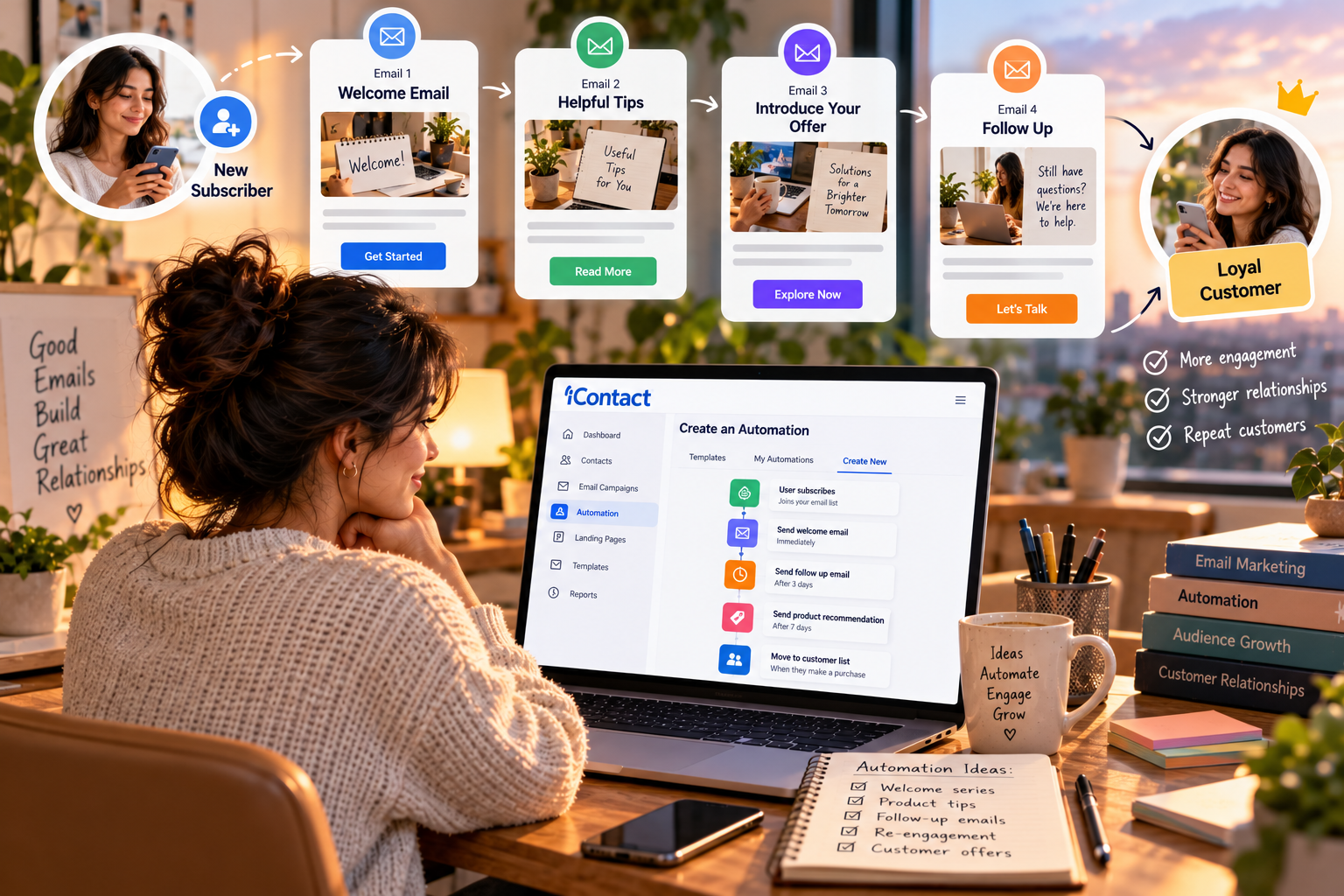
Imagine someone discovering your business today. They visit your website, sign up for updates, and leave without making a purchase. A few days later, they might forget your name entirely. Now imagine receiving a thoughtful welcome message, a useful follow-up, and occasional emails that genuinely help. The experience feels different because the relationship doesn’t end when someone leaves your website. With iContact, businesses can explore email marketing tools that support more consistent communication. The goal is not to flood inboxes with automated messages, but to make every interaction feel timely, relevant, and worthwhile.
What Email Automation Actually Means
Email automation sounds complicated until you look at an everyday example. Someone subscribes to your newsletter, and a welcome email arrives automatically. A few days later, another message shares a useful resource or explains what your business offers. Nobody has to remember to send each message manually. With iContact, you can investigate the automation options available for your plan and determine whether they suit your communication needs. Automation handles the timing, while you remain responsible for the message and the experience it creates.
Why Sending Every Email Manually Becomes Difficult
At first, sending individual emails may seem manageable. You have a small contact list, a few announcements, and enough time to respond personally. As your audience grows, however, keeping track of every new subscriber and remembering when to follow up becomes increasingly difficult. Messages get delayed, opportunities are missed, and communication becomes inconsistent. A platform such as iContact can help organize email campaigns, and its current automation capabilities may reduce repetitive work. Before building a workflow, confirm which triggers and features your selected plan supports.
Start With a Welcome Email
Your welcome email is often the first direct message someone receives after subscribing. That makes it an opportunity to set expectations and establish trust. Thank the subscriber, explain what they can expect, and deliver any promised resource or offer. You don’t need a long introduction or a detailed company history. If iContact offers a suitable welcome automation on your plan, you can use it to send this message after signup. Keep the email friendly, useful, and consistent with what subscribers were promised.
Build a Short Welcome Sequence
One email can introduce your business, but a short sequence can gradually help subscribers understand what you offer. The first message might welcome them, the second could share a practical tip, and the third could introduce a relevant product or service. Each email should have its own purpose instead of repeating the same sales pitch. When exploring iContact, check whether your plan supports the sequence you want to create. Start with a few well-written messages before adding more steps.
Make Follow-Ups Feel Natural
A follow-up can be helpful when it gives someone a reason to continue a conversation. For example, after downloading a guide, a subscriber might appreciate a related explanation or a suggestion for what to do next. The mistake is treating every interaction as permission to send another sales email. Use iContact to explore the campaign and contact-management tools available to you, then plan follow-ups around genuine subscriber interests. A useful message should make the next step clearer, not make the reader feel pressured.
Send More Relevant Emails Through Segmentation
Not everyone on your list has the same interests. A new subscriber may need introductory information, while a returning customer might prefer product updates or more advanced advice. Segmentation helps you organize contacts into groups so that messages can better match their needs. Before using iContact for segmented campaigns, verify which list-management and targeting features are included in your plan. You can begin with a simple distinction, such as new subscribers and existing customers, rather than creating numerous groups before you need them.
Choose Triggers That Make Sense
A trigger is the event that starts an automated message or sequence. A subscription, a form submission, or another supported interaction might be used to begin a workflow. The best trigger depends on what the person has done and what information would be useful next. When planning automation through iContact, check the actual triggers available rather than assuming every type of behavior can be tracked. A simple, relevant workflow is usually a better starting point than a complicated sequence built around features you may not have.
Keep Your Emails Personal
Automation should save time without making your business sound distant. Write as though you are speaking to one person, use clear language, and focus on the recipient’s needs. Avoid filling every email with generic promotional phrases or unnecessary information. If your setup with iContact supports personalization, use only the details that genuinely improve the message. Personalization should make an email more relevant, not create an uncomfortable feeling that the sender knows too much.
Decide How Often to Send Messages
A well-written automated email can still become irritating if it arrives too frequently. Consider how much communication a subscriber reasonably expects and how quickly the information becomes outdated. A welcome sequence might contain a few messages over several days, while an ongoing newsletter may follow a weekly or monthly schedule. When setting up campaigns with iContact, plan the timing carefully and consider how automated messages overlap with other emails you send. Give subscribers a consistent experience without overwhelming their inboxes.
Measure Whether Automation Is Working
An automated sequence can run perfectly and still fail to achieve its purpose. That is why reviewing performance matters. Look at clicks, conversions where measurable, replies, and unsubscribes to understand how people respond. Open rates may provide context, but privacy features can make them less reliable on their own. If you use iContact, review the reporting available on your plan and compare results across several campaigns. When something underperforms, test one improvement at a time, such as a clearer subject line or a more useful call to action.
Avoid These Common Automation Mistakes
The most common mistakes are often simple: sending too many messages, repeating the same offer, forgetting to test links, or leaving an outdated sequence running long after its information becomes irrelevant. Another problem is creating an automated workflow without checking whether the recipient has agreed to receive that kind of communication. Before activating a workflow in iContact, test every message, confirm the timing, review the links, and make sure unsubscribes and contact preferences are respected. Automation should make communication more reliable, not create problems that go unnoticed.
A Simple Plan to Get Started
You don’t need to automate your entire email strategy at once. Begin by choosing one recurring task that takes time, such as welcoming new subscribers. Write a useful message, identify the event that should trigger it, test the workflow, and check its performance after it has been running. Once that process works, consider adding a short follow-up sequence or a relevant subscriber group. Use iContact to investigate the tools available for each step, confirming current plan limits before you build your workflow around a particular feature.
Is iContact Right for Your Email Automation Needs?
The right choice depends on the size of your contact list, the messages you want to automate, your budget, and the level of control you need. Before committing, compare the available automation features, reporting, templates, contact limits, support, and cancellation terms. If you need multi-step workflows, verify that the plan you are considering includes the exact functionality required. Visit iContact to check its current offerings rather than relying on old feature descriptions or assumptions. A suitable platform should support your process without adding unnecessary complexity or cost.
A Word of Honesty
Email automation is not a shortcut to customer loyalty. It can help you communicate consistently, but the quality of your content and the relevance of your messages still determine whether people want to hear from you. Features, plan limits, and prices can change, so confirm the current details before making a decision. Treat iContact as a tool that may support your strategy, not a guarantee of more sales or stronger relationships. Start with a clear purpose, respect your subscribers’ choices, and keep improving based on real results.
Final Thoughts
The best automated emails often feel simple to the person receiving them. They arrive when expected, answer a useful question, and make the next step easy to understand. Start with a welcome email, build a short sequence only when it serves a purpose, and review the results before adding more complexity. If the available tools fit your requirements, explore iContact and begin with one workflow you can manage well. The aim is not to send more emails simply because you can. It is to make the emails you do send more timely, helpful, and worth reading.