


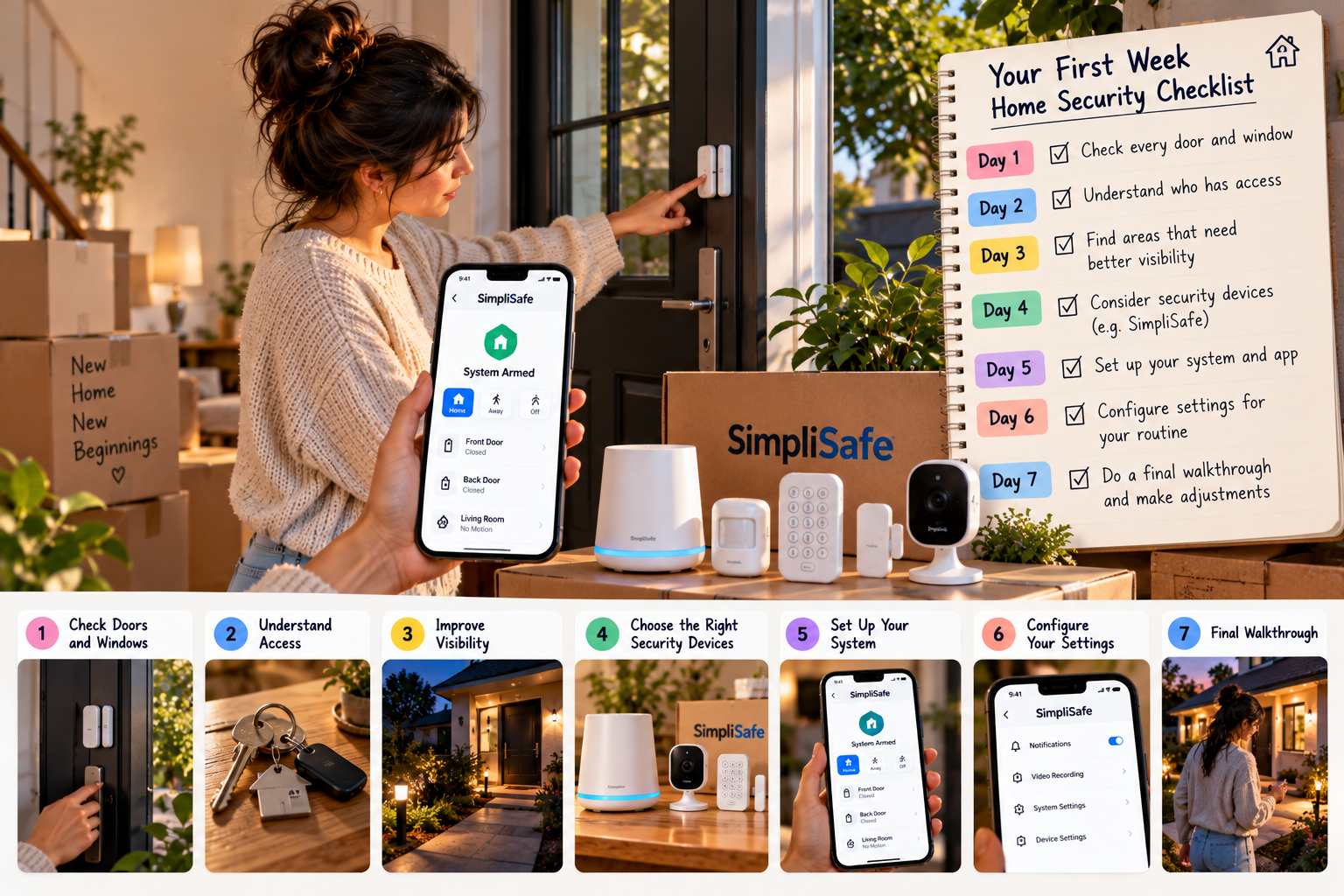
Moving into a new home comes with plenty of excitement, but there is also a long list of things to take care of before you can properly settle in. Between unpacking boxes, arranging furniture, updating your address, and figuring out your new neighbourhood, home security can easily slip down the priority list. Taking a little time to review your property during the first week can help you identify potential concerns before they become everyday problems. A home security solution such as SimpliSafe can be worth exploring as part of that process.
The first few days in a new property are an ideal time to establish good habits. You are already inspecting rooms, testing appliances, and deciding where everything belongs, so checking doors, windows, outdoor lighting, and existing security equipment fits naturally into the process. Instead of buying every device you come across, start by understanding what your home needs. This approach can help you decide whether SimpliSafe equipment would be useful for your particular property.
Day One: Check Every Door and Window
Before unpacking everything, walk through the property and inspect its main entry points. Check the front door, back door, balcony doors, accessible windows, and any entrance connecting the house to a garage. Look for damaged locks, loose handles, windows that do not close properly, or doors that require extra force to latch. Even a sophisticated security setup cannot compensate for basic entry points that are poorly maintained, which is why these checks should come before considering SimpliSafe devices.
Pay particular attention to entrances you rarely use. A side door or a window near the back of the property may be easy to overlook when you are busy arranging your new home. Make sure all locks work correctly, and contact your landlord or a qualified professional if anything needs repair. Once you understand which entrances need attention, you can decide whether additional entry sensors from a system such as SimpliSafe would provide useful extra awareness.
Day Two: Understand Who Has Access to Your Property
Moving into a previously occupied home means you may not know how many people still have keys. Previous tenants, contractors, property managers, or other individuals may have had legitimate access at some point. If you own the property, consider changing the locks or arranging a professional rekeying service where appropriate. If you rent, ask your landlord about the existing locks and the rules governing any changes before spending money on them.
Access also includes digital accounts and connected devices. If the property already has a smart lock, alarm panel, camera, or another connected security product, find out who controls it and whether the previous owner’s access has been removed. When setting up a new SimpliSafe system, use your own account credentials, choose a strong password, and share access only with people who genuinely need it.
It is also worth deciding how household members will manage access from the beginning. If several people live in the home, make sure everyone understands how the locks and security equipment work. Establishing these arrangements early can prevent confusion later, especially when someone arrives home first or needs to let a trusted visitor inside. A clearly organised setup, whether it includes SimpliSafe equipment or conventional locks, makes everyday access easier to manage.
Day Three: Find the Areas That Need Better Visibility
Walk around your home during daylight and again after sunset. Notice which entrances are visible from the street, where shadows collect, and whether bushes, walls, or parked vehicles block your view. You do not need to turn your property into a brightly lit compound. The aim is to identify areas where better visibility would make it easier to notice unexpected activity.
Outdoor lighting can be a practical starting point, particularly around entrances, pathways, and garages. Depending on the layout, a motion-activated light may be more useful than leaving every exterior light switched on throughout the night. If you want additional visibility, consider whether an outdoor camera from SimpliSafe fits your requirements, taking into account its field of view, power needs, connectivity, and installation position.
Camera placement deserves more thought than simply choosing the most obvious corner. A camera should cover the area you want to monitor without being unnecessarily obstructed by walls, plants, or other objects. You should also consider neighbours’ privacy and avoid positioning cameras where they intrude into private spaces. Before installing any SimpliSafe camera, check the product requirements and any applicable property rules.
Day Four: Decide Which Security Devices You Actually Need
It is tempting to buy a large security package as soon as you start researching home protection. However, a smaller setup chosen around your property’s real needs may be more useful than a collection of devices you rarely use. Start with your entry points, the areas you want to observe, and the problems you want to address. From there, compare the available SimpliSafe equipment and packages to see which combination makes practical sense.
Entry sensors can help detect when a protected door or window opens, while motion sensors are intended to detect movement within their coverage areas. Cameras serve a different purpose by providing visual information about selected locations. These devices are not interchangeable, so think about what each one would contribute before deciding which products to purchase.
If you are considering SimpliSafe, review the available equipment packages and the option to build a system around your requirements. Some packages include combinations of entry sensors, motion sensors, cameras, and other devices, but the contents vary. Confirm the exact package details and compatibility rather than assuming every device or feature is included.
Day Five: Set Up Your Security Routine
Security equipment becomes more useful when everyone in the household knows how to operate it. Decide who will arm the system when leaving, who is responsible for checking that doors are locked, and how household members should respond to an unexpected alert. A simple routine is easier to maintain than a complicated set of rules that people forget after a few days.
If your system offers different operating modes, take time to understand what each mode activates. For example, a Home mode may leave certain motion sensors inactive while keeping selected entry sensors enabled, whereas Away mode may activate more sensors. The default configuration can vary, so check the settings on your SimpliSafe system and adjust them where appropriate.
It is also sensible to test the equipment after installation. Learn how to arm and disarm the system, check notifications, and identify what happens when a sensor is triggered. Follow the manufacturer’s testing instructions, particularly if professional monitoring is active, so you do not accidentally initiate an unwanted response. Understanding how your SimpliSafe equipment behaves will make it easier to use consistently.
Day Six: Review Your Internet and Device Settings
Many modern security features depend on a reliable connection between your devices, your home network, and your phone. Before relying on remote access, check that your internet connection reaches the areas where connected equipment will be installed. Thick walls, distant routers, and interference can affect connectivity, so test the intended locations rather than assuming every room will have the same signal strength.
Secure your home network by changing default credentials where appropriate, using a strong Wi-Fi password, and keeping your router’s software updated. If your SimpliSafe equipment requires a particular connection or network configuration, follow the product instructions before completing setup. These small steps help you avoid preventable problems when accessing your system remotely.
Next, review the notifications you receive on your phone. Important security alerts should be easy to recognise, and your device settings should allow them to reach you when needed. At the same time, too many unnecessary notifications can become frustrating and encourage you to ignore them. Configure your SimpliSafe app and compatible devices according to the available options, and make sure you understand which notifications each setting controls.
Day Seven: Review the Details You Might Have Missed
By the end of your first week, you will probably have a better understanding of how your home works. This is a good time to revisit the areas you inspected earlier and check whether anything was missed. Perhaps a window behind a curtain was difficult to access, an exterior light needs attention, or a camera cannot capture the entrance as clearly as you expected. Use this final review to prioritise any remaining improvements.
If you have installed a security system, make sure you understand its limitations as well as its features. Camera access does not automatically mean professional monitoring is included, and not every service plan provides the same response options. Before selecting a SimpliSafe monitoring plan, check the current terms, equipment requirements, and services available with each option.
You should also consider risks beyond unauthorised entry. Depending on your property, smoke detection, carbon monoxide detection, or water-leak monitoring may be important additions to your broader home safety arrangements. These functions require appropriate devices and should not be assumed to be included in every security package. Review the compatible SimpliSafe products if you want to explore whether additional environmental sensors would suit your home.
Extra Tips for Renters Moving Into a New Property
Renting introduces a few additional considerations because you may not have permission to make permanent changes. Before drilling holes, replacing locks, or installing wired equipment, review your rental agreement and ask the landlord for approval where necessary. Many security improvements can be planned around the property’s existing features, but it is important to understand the rules before purchasing SimpliSafe equipment or arranging installation.
Keep a record of any issues you notice when you move in, especially damaged locks, broken window latches, or exterior lights that do not work. Photographing existing problems and reporting them promptly can help avoid misunderstandings later. Security devices may add another layer of awareness, but they should not be used as a substitute for asking the landlord to address basic maintenance concerns.
Portability is another factor worth considering. If you expect to move again, check whether the equipment you choose can be removed and installed at another property, and whether any components require professional installation. Before investing in a SimpliSafe setup, review the current installation guidance and make sure it suits your living arrangement.
Final Thoughts
Moving into a new home is an opportunity to establish good security habits before everyday routines take over. By checking entry points, reviewing access, improving visibility, securing your network, and testing your equipment, you can address important details without rushing into unnecessary purchases. A system such as SimpliSafe may be one part of that process, depending on your property, budget, and preferred level of protection.
You do not need to complete every improvement on the first day. Start with basic maintenance and access control, then add equipment where it provides a clear benefit. Compare the available products and service plans carefully, check installation requirements, and build a routine that everyone in your household can follow. With a practical approach to SimpliSafe and other home safety measures, you can settle into your new space with a clearer understanding of how to protect it.